Thursday, October 24, 2013

How to Work with an Editor

Editors can be scary, we know. We know how attached you are to your work and how intimidating it is to let anybody read it, let alone someone who is paid to criticize it. Today's blog is all about how to help you navigate your relationship with this scary person so that your work comes out the other end nice and polished and ready to publish.

Know What to Ask For

When you first submit your manuscript, make sure you know exactly how much editing you want your editor to do. Didn't know there were different levels of editing? Here's a quick rundown:
  • Substantive editing (sometimes called structural or content editing) is the heaviest level of editing. This involves potential rewriting or restructuring on the editor's side, which is done to ensure the highest level of comprehension and consistency. Expect to see significant changes to your work.
  • Copyediting aims to achieve accuracy, clarity, and consistency in a document. This may involve reworking sentences to make them more effective.
  • Proofreading includes checking for grammar and missing punctuation, ensuring that elements are in the proper order, etc. You will likely not see content changes.
Editors will also frequently include "queries," which are pretty much exactly what they sound like. Any questions the editor has regarding your work will be presented as a query. Sometimes they will ask your preference on certain changes or ask you to verify an aspect of your project.

Hopefully your MS doesn't look like this when you get it back.
But it might! Credit: http://nebuly.blogspot.com/
 
(Normally, editors at publishing houses will do a comprehensive or substantive edit of your work, so just expect that level of edit. But if you hire a freelancer, you will be able to specify what type you'd like. When you've gone through your freelancer and submit to a publishing house, expect it to go through another round of more intense edits.)

When you are ready to have your project edited, make sure you have these facts in mind and know what you want, otherwise what you expected to be a light proofread could come back with stricken paragraphs. Editors don't want to overstep their bounds, so make sure you tell them exactly what those bounds are.

Challenge Queries and Changes

Now, odds are you're going to disagree with some of the changes your editor is making. That's okay! It's your work, and we recognize that. If you think a change is not appropriate, let your editor know. He or she can explain their reasoning, and you can explain yours. This opens up a dialog that allows you to get what you  need while still improving your MS. Win-win!

Credit: Forbes

That said, of course, be polite when you dispute a change. Starting your objections with "I think..." or "I feel like..." is always a good way to go. Don't accuse your editor of shredding your manuscript or ruining your work. That's a good way to get your MS back without any improvements and without a refund. Realize that your editor is trying to help you get your manuscript in the best possible position before you publish, not trying to impose their own perspective.

Be Objective

On that note, sometimes it's best to trust your editor. After all, they're looking out for you and the success of your project. They also have a lot of experience working on different types of projects, and they know what needs to be done to a manuscript to really make it shine. Even though it's hard, try to let go of your feelings toward your work and see it from an outsider's perspective. You might realize that some changes you thought were too much are truly for the better.


Many authors make the mistake of allowing their egos to get in the way of editing, and this is almost always a guarantee for a shoddy product. Be humble and allow your editor to do what they do best. Working together will turn out the best version of your work you could have hoped for!

See, now, that wasn't so scary, was it?

Thursday, October 3, 2013

Finishing Your Novel

Different writers struggle with different parts of writing a manuscript. Some have trouble keeping a consistent voice throughout. Some have difficulties creating a convincing character. And some write dialog that is forced and frustrating. These are all legitimate problems, but they can be solved during the revision process (and an editor can help you pick them out). The bigger issue is actually getting to the revision process. Below, you will find four tips on how to actually finish that elusive first draft of your manuscript.


1. Create an outline

An outline is like a treasure map. When you outline, you set up a story from start to finish, and you know exactly where it's going to end up. The plan may put your character on a dangerous path full of craggy mountains, goopy quicksand, and treacherous villains, but the prize lay at the end. An outline can seriously help you finish a manuscript. You can write your novel in order by following the map and eventually making it to the end. Or you can write out of order; you write the scenes that are in your head right then. Both strategies work because you know what scenes you will eventually have to work on. It's almost like a checklist. If you decide to use this tactic, taking time to consult the outline will help you stay on track, get excited about coming scenes, and work toward the end of the manuscript.

J. K. Rowling's "Writing Grid" style of outlining.

2. Don't look back

Every time you sit down at your computer to bust out another 2,000 words, do not go to the start of the novel and start reading. If you need to refresh your memory about what is going on, read the very last few paragraphs that you've written. That will remind you of the plot and tone of the story. Of course, if there are details you need to remember, you can glance back, but try not to. The reason for this is that you could get stuck in another chapter. You may begin reading and editing and revising and changing. And then you'll look at the clock and think, Wow! I just spent three hours on chapter one! This may not seem like a big deal, but if you spend every day reading and editing and revising and changing chapter one, you'll never get to the actual writing of chapter five. So here's what to do: Don't go back. If you see errors, just leave them. Or make a comment about it. But make your focus the actual writing of the book. Revision time will come. But right now, it's writing time.


3. Have a reader

This can be extremely beneficial to a novelist. Find someone you trust and talk to them about your novel. Get them excited about it, and then ask them if they'll read it. Tell them that this is a first draft and that you aren't editing or revising just yet. Ask them to make comments about what they like and don't like, but ask them not to edit or suggest changes (yet). Then write! Send your friend whatever you have whenever it's done. Don't think about the errors, typos, or other issues, just send it off! Since your reader is excited about your story, they will pester you: "Hey, I haven't seen a chapter in the past few days. You should send it to me!" Or "Have you written more lately? I can't wait to find out what happens next." Or even, "It's been two weeks, and I'm growing impatient. What's going on?" This pestering will motivate you to keep writing because someone actually cares and wants to know where the story is going and, more importantly, how the story will end.


4. Look into NaNoWriMo

National Novel Writing Month happens every year during November. Basically, you commit to writing a complete novel of 50,000 words in 30 days. The rules state that you cannot begin writing your manuscript until November 1, but you can outline and prepare as much as you want before that time. NaNo helps you finish a novel because it is a challenge. If you register through the website and finish the 50K before December 1, you get cool coupons that writers want. Though the coupons are exciting, the feeling of completion is even better. By the end of ONE MONTH, you've actually written 50,000 WORDS! Your novel may be finished at 50K, and that's great. You've hit the finish line! But if your story isn't over at the 50K mark and there's more writing to be done, just keep writing into December and January and February and forever! Not only does NaNo motivate you to write every single day (or at least 2K a day, six days a week), it helps you build a habit of writing every single day. When November ends, your writing doesn't have to. You can keep going. And, more than likely, your habit will push you to do it every day until you do write the last few words of that manuscript.


These tips can help you reach that coveted accomplishment as a writer: a completed manuscript. Of course, the revision process comes next. But before you dive right into revising and reworking your precious first draft, take a moment to savor what you've just done! You reached the finish line! You wrote a book! Yes, the road to publishing is full of bumps and bruises, but this is a shining moment that you should be proud of.


Wednesday, September 25, 2013

Your Guide to Hyphens and Dashes

Hyphens and dashes often bring confusion to writers. Each mark has its different uses, and each mark can be hard to distinguish from others, and even hard to type.

These marks are all used to separate or conjoin items, but there are different types of separation and conjunction, for each of which there is a certain type of dash you should use. The most common dashes are the hyphen, the en dash, and the em dash. Let's start with the en dash.


En Dashes

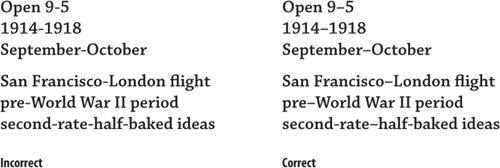
En dashes (named so because they are the width of a capital N) have two primary uses: to separate ranges ("Please sit in rows 55–60."), and to hyphenate open compounds ("pre–Civil War"). They typically aren't used in Web copy or in newspapers; you'll usually see a hyphen there instead. But if you notice a longer-than-normal hyphen (see that compound modifier? Check out the hyphen section), it's probably an en dash, and it's a mark of good typesetting.

Credit: etutorials.com


 Em Dashes

Em dashes (which are named, as you might have guessed, after the fact that they are the width of a capital M) have myriad uses. They can be used to set off a phrase in lieu of commas—which are an excellent punctuation mark—or they can indicate a sudden change in thought: "So, there I was, about to board the train—wait, is that Mark?"


Hyphens

Believe it or not, the mark that's the most familiar to most people is the most complex. Grammatically, hyphens can be used in compound words ("left-handed"), as separators ("my name is spelled A-B-B-Y"), and to combine adjective phrases ("His less-than-useful suggestions left everyone confused."). Hyphens are primarily used (as with most punctuation marks) to eliminate ambiguity.


For example, if a writer were to use the phrase "little celebrated paintings," a reader wouldn't know whether the writer meant "celebrated paintings that are small" or "paintings that are not celebrated very much." If we stick a hyphen in there, "little-celebrated paintings," the two words become connected, and it's clear that they are both meant to modify "paintings."

Things can get confusing when two hyphenated terms with the same suffixes are used. For example, "Corruption was rampant in nineteenth- and twentieth-century politics." (Corruption totally doesn't happen in today's politics, right?)

Hyphens are also often used to separate prefixes from the main word, though this practice has been declining. Chicago prefers leaving hyphens out wherever possible, so to be safe, only hyphenate prefixes if omitting it could alter the meaning of a word, such as "recreation" versus "re-creation" (7.80). Another exception is when the main word is a proper noun, as in "un-American."


How to Type Each Mark

Now that you know how to use them, we'll let you know how to type them so you can start using them in your daily life! Aren't we generous? Keep in mind that, generally, these marks do not need spaces around them.

If you're on a Mac
En dash: option+hyphen
Em dash: shift+option+hyphen

If you're on a PC
En dash: alt+0150
Em dash: alt+0151

That's all there is to it, folks. As always, if you have any questions, leave 'em in the comments and we'll get back to you!